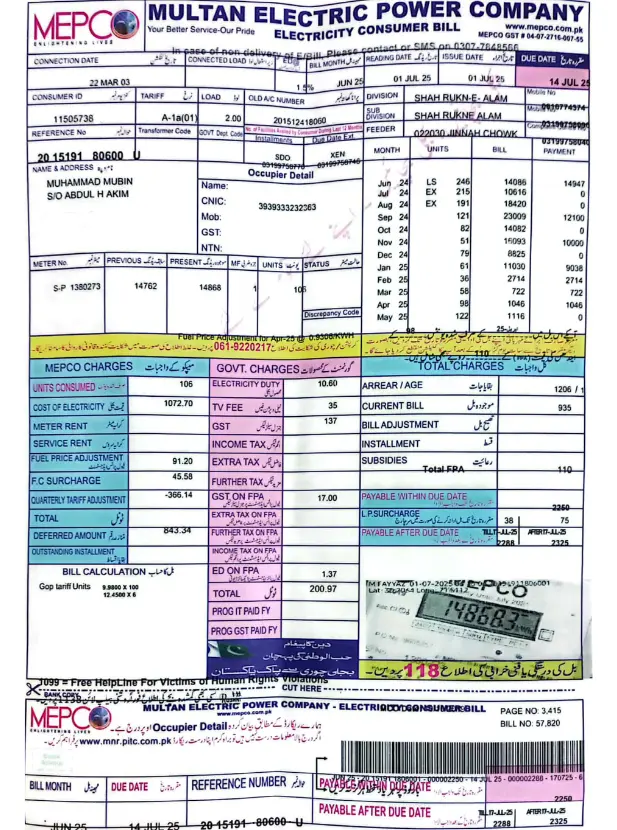

Electricity bills have become an essential part of monthly household management. Yet, many people still wait for paper bills to arrive, only to discover they are delayed, misplaced, or damaged. If you live in South Punjab and rely on the Multan Electric Power Company, there is a faster and more convenient solution available.
With the MEPCO online bill service, you can check your latest electricity charges, download duplicate copies, print bills whenever needed, and stay updated about payment deadlines without leaving your home.
Whether you’re a homeowner, tenant, student, or business owner, learning how to access your bill online can save time and prevent unnecessary stress.
In this complete guide, you’ll discover everything you need to know about checking your MEPCO online bill, understanding the information printed on it, solving common issues, and making payments through multiple channels.
What Is MEPCO?
Multan Electric Power Company, commonly known as MEPCO, is one of Pakistan’s largest electricity distribution companies. It supplies electricity to millions of consumers across South Punjab.
The company serves several districts, including:
- Multan
- Bahawalpur
- Dera Ghazi Khan
- Rahim Yar Khan
- Muzaffargarh
- Khanewal
- Vehari
- Lodhran
- Sahiwal
- Pakpattan
- Bahawalnagar
- Rajanpur
- Layyah
MEPCO manages residential, commercial, industrial, and agricultural electricity connections across its service area.
The introduction of the MEPCO online bill system has significantly improved customer convenience by reducing dependency on physical bill delivery.
Why Use the MEPCO Online Bill Service?
Checking your electricity bill online offers several practical advantages.
Instant Access Anytime
You don’t have to wait for your monthly bill to arrive. Your bill details become available online before the due date.
Avoid Late Payment Charges
Delayed bill delivery can result in late fees. Accessing your MEPCO online bill ensures you know your due date in advance.
Download Duplicate Bills
Lost your original bill? No problem. You can easily generate a duplicate bill online.
Easy Record Keeping
Save digital copies for future reference, expense tracking, or tax documentation.
Environmentally Friendly
Reducing paper usage helps minimize environmental impact.
How to Check Your MEPCO Online Bill
Accessing your bill online is straightforward and takes only a few minutes.
Follow these simple steps:
- Open your preferred web browser.
- Visit the official MEPCO bill checking portal.
- Locate the bill inquiry section.
- Enter your 14-digit reference number or customer ID.
- Click the submit button.
- View your latest electricity bill instantly.
Once displayed, you can download or print the bill for your records.
The MEPCO online bill system works on desktops, laptops, tablets, and smartphones.
Where to Find Your Reference Number
Many consumers struggle to locate the required reference number.
You can find it on any previous electricity bill.
Typically, the reference number appears near the top section of the bill and contains 14 digits.
Alternatively, some bills also include a customer ID, which can be used for online bill retrieval.
Always enter the number carefully to avoid errors.
Understanding the Information on Your Bill
When you access your MEPCO online bill, you’ll notice several details that may seem confusing at first.
Here’s a quick breakdown.
| Bill Section | Description |
|---|---|
| Consumer Name | Registered account holder’s name |
| Reference Number | Unique bill identification number |
| Customer ID | Consumer account identifier |
| Billing Month | Current billing period |
| Due Date | Last date for payment |
| Meter Reading Date | Date when meter data was collected |
| Previous Reading | Last recorded meter units |
| Current Reading | Latest meter units |
| Units Consumed | Total electricity usage |
| Tariff Category | Type of connection |
| Total Amount | Payable bill amount |
| Taxes and Surcharges | Government and service charges |
Understanding these sections helps you monitor your monthly electricity consumption and identify unusual increases.
How to Download a Duplicate MEPCO Bill
Misplacing a paper bill is common. Fortunately, getting a duplicate copy is simple.
Follow these steps:
- Open the MEPCO bill inquiry page.
- Enter your reference number.
- View your current bill.
- Select the download option.
- Save the PDF file to your device.
Having a digital copy ensures you can access your bill whenever needed.
Many users save monthly bills in a dedicated folder for easy tracking.
How to Print Your MEPCO Online Bill
After downloading the PDF, printing is quick and easy.
Using a Computer
- Open the downloaded file.
- Press Ctrl + P on your keyboard.
- Select your printer.
- Adjust print settings if necessary.
- Click Print.
Using a Mobile Phone
- Open the PDF using your preferred app.
- Tap the print icon.
- Connect to a wireless printer.
- Print your bill.
A printed copy is accepted at banks, payment centers, and customer service offices.
Different Ways to Pay Your MEPCO Bill
The convenience of the MEPCO online bill service extends beyond bill checking.
You can also choose from multiple payment methods.
Mobile Banking Apps
Most banks in Pakistan allow electricity bill payments through their mobile apps.
Internet Banking
Log in to your bank’s online portal and pay directly from your account.
ATM Machines
Many ATM networks support utility bill payments.
Digital Wallets
Popular e-wallet services offer quick and secure transactions.
Retail Payment Agents
You can also pay your bill through authorized retailers and payment centers.
Bank Branches
Traditional over-the-counter payments remain available for customers who prefer in-person service.
Always keep your payment receipt until the next billing cycle.
Common Reasons Your Bill Amount Changes
Have you noticed fluctuations in your monthly charges?
Several factors can affect your electricity bill.
Seasonal Usage
Air conditioners in summer and heaters in winter significantly increase consumption.
Tariff Revisions
Government-approved electricity tariff changes impact overall charges.
Fuel Price Adjustments
Fuel cost adjustments may increase or decrease your payable amount.
Increased Appliance Usage
New appliances or longer usage hours naturally raise electricity consumption.
Meter Reading Differences
Estimated readings or meter issues can affect billing accuracy.
Reviewing your MEPCO online bill each month helps you identify these changes early.
What to Do If Your Bill Is Missing
Sometimes, consumers don’t receive their paper bill.
Instead of waiting, take these steps:
- Check your MEPCO online bill immediately.
- Verify your reference number.
- Download a duplicate copy.
- Contact customer support if the bill isn’t available.
- Confirm that your account information is accurate.
Regular online checks help prevent missed payments.
Troubleshooting Common MEPCO Online Bill Issues
Occasionally, users may encounter problems while accessing their bills.
Invalid Reference Number
Double-check all digits before submitting.
Website Not Loading
Try refreshing the page or using a different browser.
Bill Not Available Yet
New bills may take time to appear after meter readings.
Incorrect Consumer Information
Contact customer service to update account details.
Slow Internet Connection
Ensure you have a stable connection before accessing the portal.
Most issues can be resolved within minutes.
Tips to Reduce Your Electricity Bill
Checking your MEPCO online bill regularly is only the first step. Reducing consumption can help lower costs over time.
Consider these practical tips:
- Switch to LED lighting.
- Unplug unused devices.
- Use energy-efficient appliances.
- Maintain air conditioners regularly.
- Avoid using high-power appliances during peak hours.
- Set refrigerators to recommended temperatures.
- Turn off lights when leaving a room.
- Insulate your home during extreme weather.
Small changes can lead to noticeable savings.
Why Monitoring Your Monthly Bill Matters
Many consumers only look at the payable amount and ignore the rest of the bill.
However, reviewing your MEPCO online bill each month provides valuable insights.
You can:
- Detect unusual consumption patterns.
- Track seasonal changes.
- Identify billing errors.
- Monitor energy-saving efforts.
- Plan household expenses more effectively.
Consistent monitoring helps you stay in control of your utility costs.
MEPCO Online Bill for Businesses
Business owners benefit greatly from online bill access.
Commercial users often manage multiple electricity connections, making digital access essential.
Benefits include:
- Faster expense management
- Simplified accounting records
- Easy bill sharing with finance teams
- Better cash flow planning
- Quick duplicate bill generation
The MEPCO online bill system helps businesses streamline administrative tasks and avoid payment delays.
Final Thoughts
Managing electricity bills no longer needs to be frustrating or time-consuming. The MEPCO online bill service gives consumers instant access to billing information, duplicate copies, payment details, and consumption records from anywhere.
Instead of waiting for a paper bill every month, make it a habit to check your bill online. You’ll avoid late fees, stay informed about your electricity usage, and keep better control over your household or business expenses.
If you haven’t used the MEPCO online bill system yet, now is the perfect time to start. Save your reference number, bookmark the bill portal, and simplify your monthly routine.