
Streaming movies and TV shows has become part of everyday life, and Netflix remains one of the most popular entertainment platforms in the world. But what happens when you suspect someone else is using your account? Maybe you’ve shared your login with friends years ago, or perhaps you simply want to improve your account security. Whatever the reason, learning how to change Netflix password is one of the easiest ways to protect your account.
The good news is that updating your Netflix password only takes a few minutes. You don’t need to be tech-savvy, and the process works on almost every device. In this guide, I’ll walk you through each step in a simple, beginner-friendly way while also sharing useful security tips to help you keep your account safe in the future.
Let’s get started.
Why You Should Change Your Netflix Password
Many people only change their passwords after something goes wrong. However, regularly updating your password is actually a smart habit.
Here are some common reasons to change your Netflix password:
- Someone else knows your password.
- You notice unfamiliar viewing activity.
- Your account has been shared with too many people.
- You received a suspicious login notification.
- Your email or another online account was compromised.
- You simply want stronger account security.
Even if nothing seems wrong, changing your password every few months helps reduce security risks.
How to Change Netflix Password in 5 Easy Steps
If you’re wondering how to change Netflix password, simply follow these five easy steps.
Step 1: Sign In to Your Netflix Account
Open the Netflix app or website and sign in using your current email address and password.
Once you’re logged in, you’ll see your Netflix home screen.
Make sure you’re using the primary account owner’s profile because only the account owner can change the password.
Step 2: Open Your Account Settings
Click on your profile icon located in the upper-right corner.
From the dropdown menu, choose Account.
This page contains all your account information, including:
- Membership details
- Billing information
- Security settings
- Device management
- Viewing activity
- Password options
The Account page is where you’ll manage everything related to your Netflix subscription.
Step 3: Select “Change Password”
Under the Membership & Billing section, click Change Password.
Netflix will ask you to enter:
- Your current password
- Your new password
- Your new password again for confirmation
This extra verification helps prevent unauthorized password changes.
Step 4: Create a Strong New Password
Choosing a secure password is just as important as changing it.
A strong password should:
- Be at least 8 characters long
- Include uppercase letters
- Include lowercase letters
- Contain numbers
- Use special characters if possible
- Avoid personal information like birthdays or names
Examples of weak passwords include:
- password123
- netflix2024
- qwerty123
Better examples include:
- BlueRiver#82Sun
- Coffee!Rain45Moon
- Winter&Sky917
Avoid reusing passwords you’ve used on other websites.
Step 5: Save the Changes
Click Save after entering your new password.
Netflix may offer the option to sign out of all devices currently using your account.
If you think someone else has access to your account, always check this option.
Your new password will immediately become active.
Congratulations—you’ve successfully learned how to change Netflix password.
What Happens After Changing Your Netflix Password?
After changing your password, several things may happen.
You may need to:
- Sign in again on your Smart TV
- Log in on your smartphone
- Update the password on your tablet
- Re-enter credentials on your laptop
- Log back in on streaming devices
Anyone who previously had your password will no longer be able to access your account unless you share the new one.
How to Change Netflix Password on Mobile
Many people prefer using their phones.
The process is almost identical.
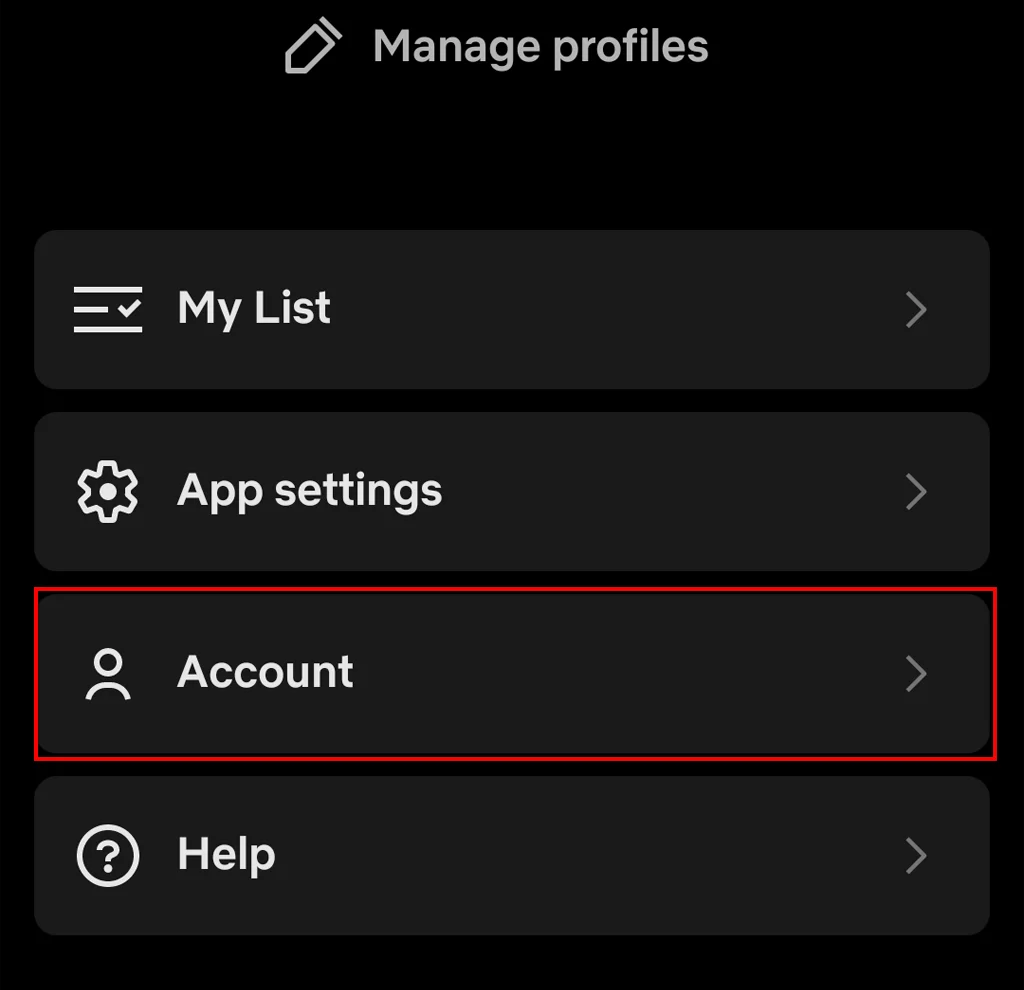
- Open the Netflix app.
- Tap your profile.
- Go to Account.
- Open the browser settings page.
- Select Change Password.
- Enter your old password.
- Enter your new password.
- Save your changes.
Learning how to change Netflix password on mobile is just as easy as doing it on a computer.
How to Change Netflix Password Without the Current Password
Forgot your existing password?
Don’t worry.
Here’s what to do:
- Go to the Netflix login page.
- Select Forgot Password.
- Choose password recovery through email or text message.
- Follow the verification instructions.
- Create a new password.
- Sign back into your account.
This recovery process helps ensure only the account owner regains access.
Tips for Creating a Secure Netflix Password
A secure password keeps hackers away.
Here are some practical tips:
- Never use your name.
- Avoid birthdays.
- Don’t use simple number sequences.
- Mix letters, numbers, and symbols.
- Use a password manager.
- Never reuse passwords from other accounts.
- Change your password regularly.
Small habits like these make a huge difference.
Signs Someone Else Is Using Your Netflix Account
Not sure whether you should change your password?
Watch for these warning signs.
Strange Viewing History
Shows appear that you’ve never watched.
New Profiles
Unexpected profiles suddenly appear.
Login Alerts
You receive notifications about unfamiliar devices.
Changed Account Information
Someone modifies your email or phone number.
Playback Interruptions
Netflix tells you too many devices are already streaming.
If you notice any of these issues, immediately learn how to change Netflix password and log out of all devices.
How to Sign Out of All Devices
Changing your password is good.
Signing out everywhere is even better.
Simply:
- Go to Account.
- Scroll to Security.
- Select Sign Out of All Devices.
- Confirm your choice.
Within a short time, every logged-in device will require the new password.
Common Mistakes to Avoid
People often make these mistakes after changing their Netflix password.
Sharing the New Password Again
Giving everyone your new password defeats the purpose.
Using Weak Passwords
Simple passwords are easier to guess.
Ignoring Suspicious Activity
Always investigate unfamiliar login attempts.
Forgetting to Update Saved Passwords
Remember to update your browser and password manager.
Using Public Wi-Fi
Avoid changing passwords while connected to unsecured public networks.
Benefits of Changing Your Netflix Password Regularly
Updating your password offers several advantages.
| Benefit | Why It Matters |
|---|---|
| Better security | Prevents unauthorized access |
| More privacy | Protects viewing history |
| Account control | Removes unwanted users |
| Safer payments | Keeps billing information secure |
| Peace of mind | Reduces hacking risks |
Extra Security Tips for Netflix Users
Besides knowing how to change Netflix password, consider these security practices:
- Keep your recovery email updated.
- Protect your email account with a strong password.
- Enable two-step verification on your email account.
- Review your recent login activity regularly.
- Remove old or unused devices.
- Keep your apps updated.
- Avoid phishing emails pretending to be Netflix.
- Never enter your password on suspicious websites.
These simple habits significantly improve your overall account protection.
Why Password Security Matters More Than Ever
Cybersecurity threats continue to grow every year. While Netflix itself uses secure technology to protect customer data, weak passwords remain one of the biggest causes of unauthorized account access.
Many people unknowingly reuse the same password across multiple websites. If one website experiences a data breach, cybercriminals often try those same login details on streaming services, online shopping accounts, banking apps, and social media platforms. This technique is known as credential stuffing.
That’s why understanding how to change Netflix password is about much more than simply updating one account. It’s part of maintaining better digital security overall.
Creating unique passwords for each online account may seem inconvenient at first, but it greatly reduces your risk of becoming a victim of cybercrime. Pairing strong passwords with a reliable password manager can make managing multiple accounts much easier while improving your online safety.
Conclusion
Learning how to change Netflix password is one of the quickest and smartest ways to protect your streaming account. Whether you’re dealing with suspicious activity, improving your online security, or simply updating an old password, the process takes only a few minutes and offers long-term peace of mind.